Free & MIT licensed
ArcDLP Open source video downloader
ArcDLP downloads video and audio from YouTube, Vimeo, Instagram, SoundCloud and over a thousand other sites. Paste a link, pick a quality, done. No ads, no upload limits, no account, and nothing ever leaves your machine.
- Stars
- 204
- Forks
- 24
- Version
- v1.4.x
- Price
- Free
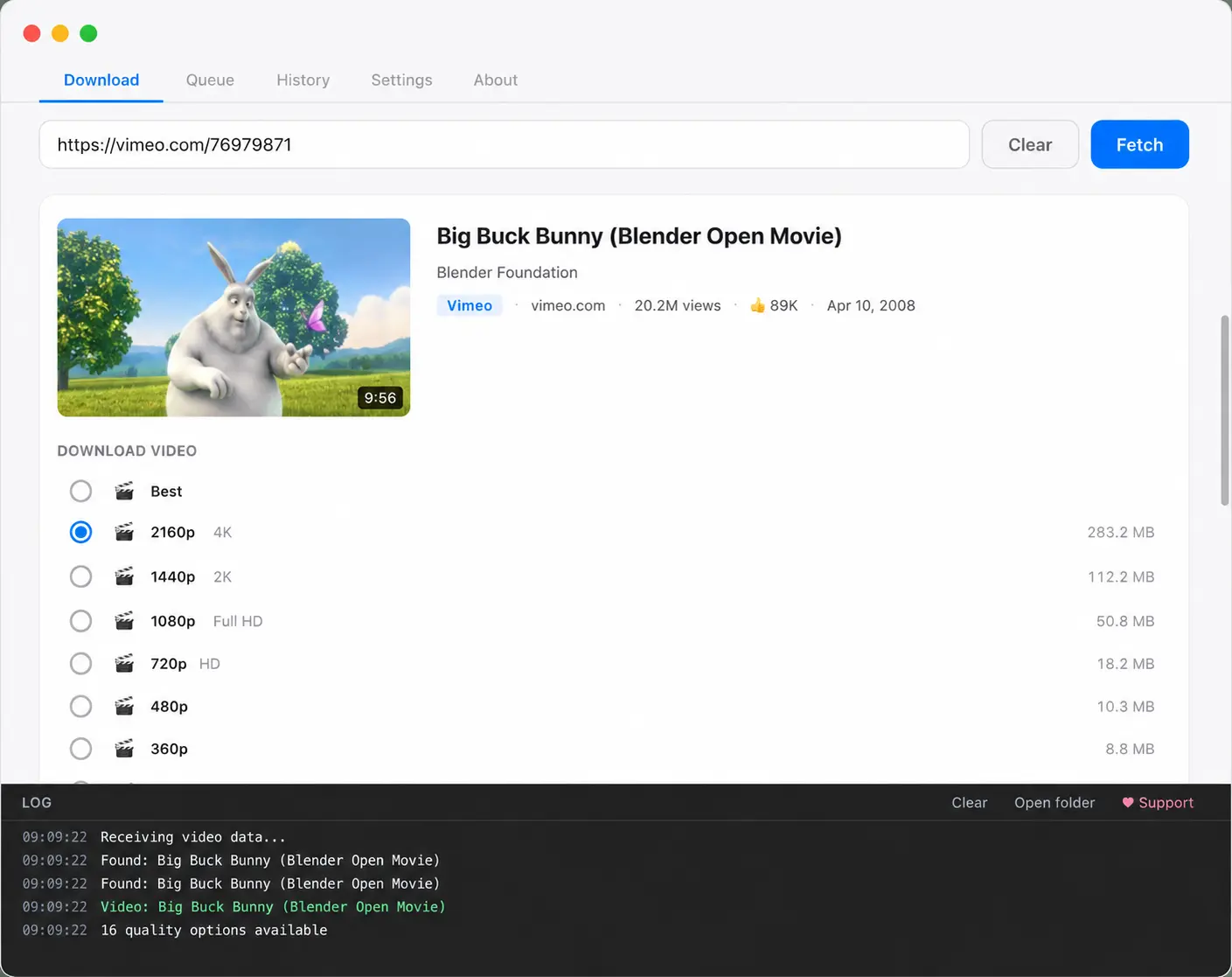
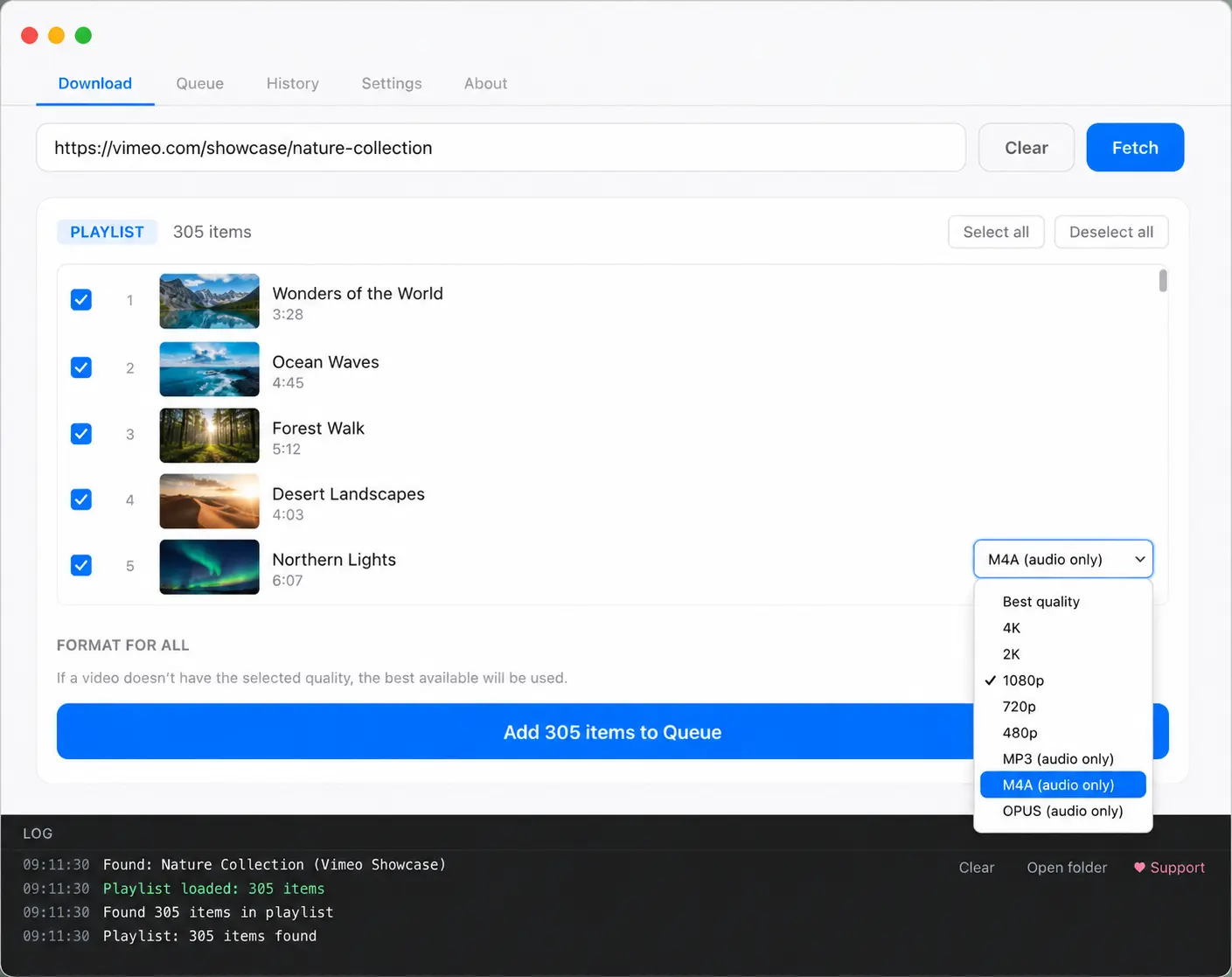
The log panel is in every screen. You always know what the app is doing.
Supported sites
Download video from any site, not just YouTube
ArcDLP inherits the full extractor list from yt-dlp, so it works on well over a thousand sites. Format detection adapts per site instead of assuming YouTube behaviour, which is why odd sources with muxed streams or missing codec metadata still produce usable quality options. Instagram gets extra treatment on top: ArcDLP can also bulk download an entire saved collection, which yt-dlp cannot do on its own.
- YouTube
- Vimeo
- Twitter / X
- SoundCloud
- Twitch
- Dailymotion
- Bandcamp
- Archive.org
- + 1,000 more
Features
Built for the boring parts
Most downloaders handle one video well and fall apart on forty. ArcDLP is designed around the assumption that something will fail, and that one failure should never take the rest down with it.
Quality presets with real sizes
Every resolution the source actually offers, from 4K down to 240p, each showing an estimated file size before you commit. Sizes account for the codec you picked.
Audio extraction
Pull audio out as MP3, M4A or Opus at maximum quality. Useful for lectures, podcasts and DJ sets where you never wanted the video in the first place.
Playlists and channels
Paste a playlist or channel URL and tick exactly the items you want. Pick one format for the batch and the whole thing queues up.
Codec selection
Choose H.264 for editor compatibility, VP9 or AV1 for smaller files. It is a preference rather than a hard filter, so a missing codec never fails a download.
A queue that survives failures
Items download one at a time with their own progress, retry and skip. A dead link in position 12 does not stop items 13 through 40.
Nothing phones home
No analytics, no telemetry, no account. The app talks to the sites you paste in and checks GitHub for a new version. That is the entire list.
How it works
Four steps, in this order
-
01
Paste a link
Any video, playlist or channel URL. ArcDLP works out on its own whether it is looking at one item or three hundred.
-
02
Pick a quality
Title, channel, duration and thumbnail load first, then the quality list with file sizes. Or switch to audio only.
-
03
Add to queue
Downloads start immediately. Keep pasting more links while the first one runs, they stack up in a side panel.
-
04
Open the folder
Files land in a folder you choose, named after the video. One button in the queue takes you straight there.
yt-dlp, without the terminal
Why not just use the command line?
You absolutely can, and yt-dlp is superb. But installing it means dealing with Python
or Homebrew, then installing ffmpeg separately, then learning format selector syntax
like
bv*[height<=1080]+ba/b
before you can pick 1080p. ArcDLP bundles both binaries and turns that string into a
radio button.
The trade is deliberate: ArcDLP does not try to expose every yt-dlp flag. It surfaces the handful that most people actually reach for and gets out of the way. If you want the deeper comparison, read the full guide to running yt-dlp with a GUI.
Download
Get ArcDLP
Current release v1.4.x. yt-dlp and ffmpeg are bundled inside the app, so there is nothing else to install.
ArcDLP is not code signed yet, so macOS and Windows will each warn you once on first launch. The platform guides above walk through the exact clicks. Prefer to build it yourself? Clone the repo.
Guides
Setup and how-to
yt-dlp GUI: the complete guide
What a graphical front end for yt-dlp does and does not give you, how the format selectors map to buttons, and how ArcDLP compares to Stacher and the rest.
Video downloader for Mac
Install on Apple Silicon and Intel, clear the Gatekeeper warning properly, and pick the codec that will actually import into Final Cut and Premiere.
Video downloader for Windows
Get past SmartScreen, install without admin rights, and fix the Windows Media Player audio problem that catches people out on YouTube downloads.
Video downloader for Linux
Run the AppImage on Ubuntu, Fedora and Arch, sort out FUSE, and add a desktop entry so it shows up in your launcher like a normal app.
Instagram saved collection downloader
yt-dlp has no extractor for saved collections. Here is why that is, and how ArcDLP scrapes the page with your own session to bulk download every reel in one.
FAQ
Common questions
Is ArcDLP really free?
What is the difference between ArcDLP and yt-dlp?
Which sites does ArcDLP support?
Does ArcDLP send my data anywhere?
Why does macOS or Windows warn me when I open ArcDLP?
Can ArcDLP download an entire playlist at once?
Is downloading videos legal?
Free, and staying that way
ArcDLP has no revenue model. If it saves you time, a star on the repo is the most useful thing you can do, and it costs nothing.