Guide
How to download a video from any website
A free, safe way to save videos from YouTube, Instagram, X, TikTok, Reddit, Vimeo and over a thousand other sites, on Mac, Windows or Linux. No browser extension and no shady converter sites.
You found a video you want to keep. Maybe it is a lecture, a clip from X, a reel, or a talk on a conference site. The usual options are all a bit painful: online converter sites covered in pop-ups, browser extensions that stop working, or screen recording that loses quality and sound.
There is a better way. yt-dlp is the open source engine that most serious video downloaders are built on, and it supports more than a thousand websites. ArcDLP is a free desktop app that puts yt-dlp behind a simple window, with everything it needs already built in.
How to download a video from a website
- Download ArcDLP for Mac, Windows or Linux and open it.
- Copy the address of the page with the video, from your browser's address bar.
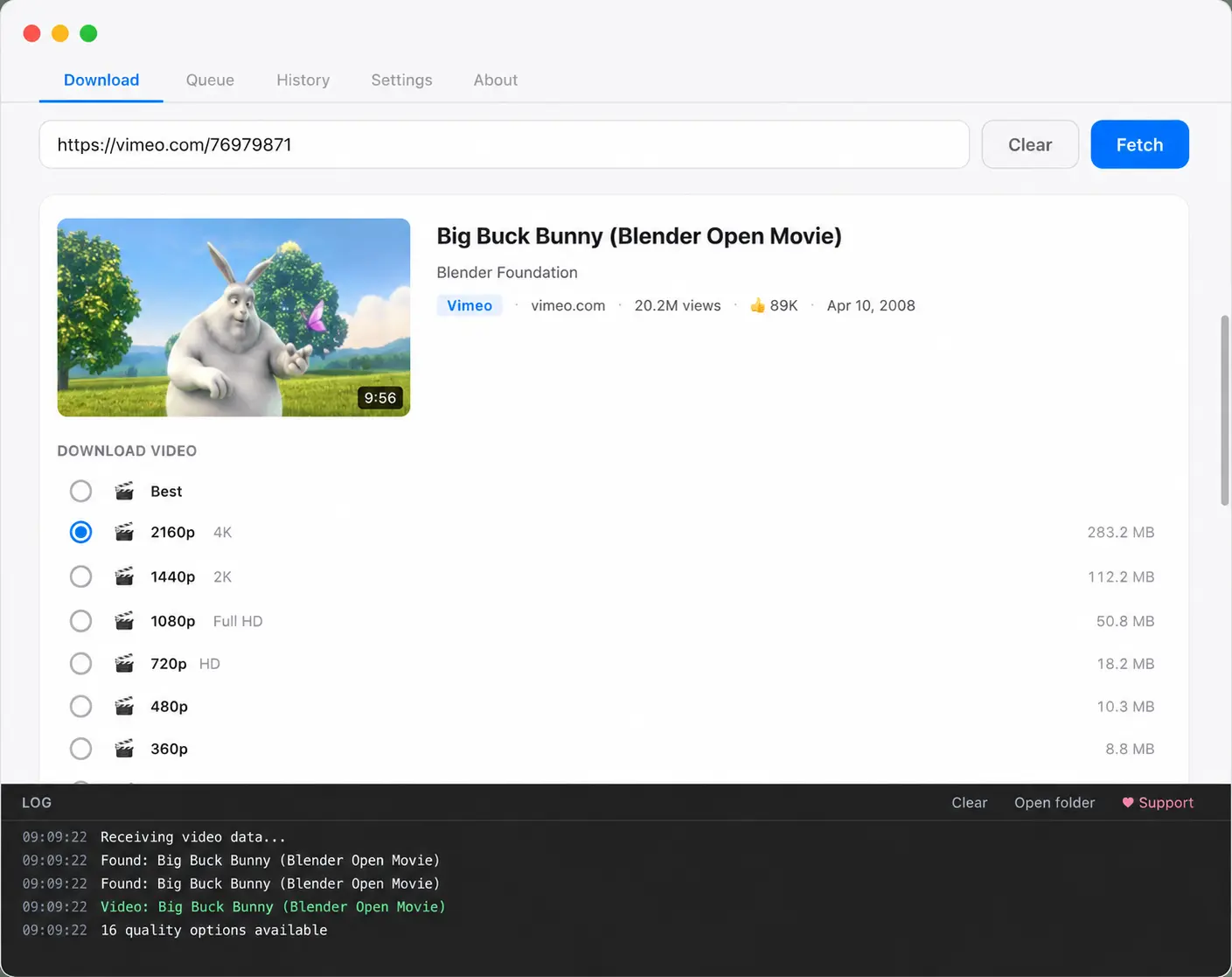
- Paste it into ArcDLP and click Fetch (or press Enter). You can also drag the link onto the window.
- Pick a quality, or MP3, M4A or Opus if you only want the audio.
- Click Add to Queue. The file is saved in your
Downloads/ArcDLPfolder.
That's it. No Python, no Terminal, no separate ffmpeg install, and no account.
Which websites work?
Anything on yt-dlp's list of supported sites, which includes:
- Video platforms: YouTube, Vimeo, Dailymotion, Twitch, Bilibili
- Social media: Instagram, X (Twitter), TikTok, Reddit, Facebook
- Audio: SoundCloud, Bandcamp, Mixcloud
- News, education and archives: many news sites, lecture platforms and the Internet Archive
For sites that are not on the list, yt-dlp still tries a generic method that looks inside the page for a video player. It works on a lot of ordinary websites with embedded videos, so it is always worth pasting the page address and seeing what comes back.
Getting the best quality
After you click Fetch, ArcDLP shows every quality the site actually offers, from 4K down to 240p, each with an estimated file size. Best picks the highest quality available.
Video is saved as MP4 with AAC audio, so it plays in QuickTime, Windows Media Player, phones and every video editor. If you prefer smaller files, choose VP9 or AV1 under Settings → Video. If you edit in Final Cut Pro, Premiere or DaVinci Resolve, choose H.264.
Saving just the audio
For podcasts, talks, music and DJ sets, pick MP3, M4A or Opus instead of a video quality. ArcDLP saves the best audio the site offers and adds the title, artist and cover art to the file, so it looks right in your music app.
Posts with several videos
An Instagram carousel, a Reddit gallery or an X post can hold more than one video. ArcDLP opens those as a list, so you tick the ones you want instead of getting an error. Whole playlists and channels work the same way, see how to download an entire YouTube playlist.
Private, age-restricted and members-only videos
Some videos need you to be signed in. In Settings, sign in to YouTube or Instagram on their own login page, inside ArcDLP. Your password goes to Google or Instagram, never to ArcDLP. After that, videos your account can watch can be downloaded too. For Instagram you can even save an entire saved collection at once.
When a video won't download
- The site changed. Open Settings → Dependencies and click Update next to yt-dlp.
- It needs an account. Sign in under Settings, as described above.
- It's blocked where you are. Set a proxy under Settings → Network.
- It's a paid streaming service like Netflix, Disney+ or Prime Video. These use DRM, and ArcDLP cannot download them.
Why not use an online downloader or a browser extension?
Online "video downloader" sites make money from ads, so they are full of pop-ups and fake download buttons. They also see every link you paste, and many limit you to low quality or one video at a time. Browser extensions for YouTube are not allowed in the Chrome Web Store, so the ones you find elsewhere tend to break or come from unknown sources.
A desktop app avoids all of that. ArcDLP runs on your computer, talks directly to the site, has no ads and no tracking, and its source code is public.
Is it legal?
It depends on the video and where you live. Downloading your own videos, public domain and Creative Commons works, or videos the owner lets you download is generally fine. Downloading copyrighted videos without permission usually is not, and may break the site's terms. See the terms of use.
FAQ
Can I really download a video from any website?
Do I need to install yt-dlp, ffmpeg or Python first?
How do I download a video that is embedded in a page?
Is this safer than an online video downloader site?
A site worked yesterday and fails today. What happened?
Download ArcDLP
Free and open source. v1.5.2. yt-dlp, ffmpeg and Deno are built in, so there is nothing else to install.