Guide
How to download an entire YouTube playlist (or a whole channel)
Save every video in a playlist or channel at once, as video or as MP3, on Mac, Windows or Linux. Free, no limits on how many videos, and one broken video never stops the rest.
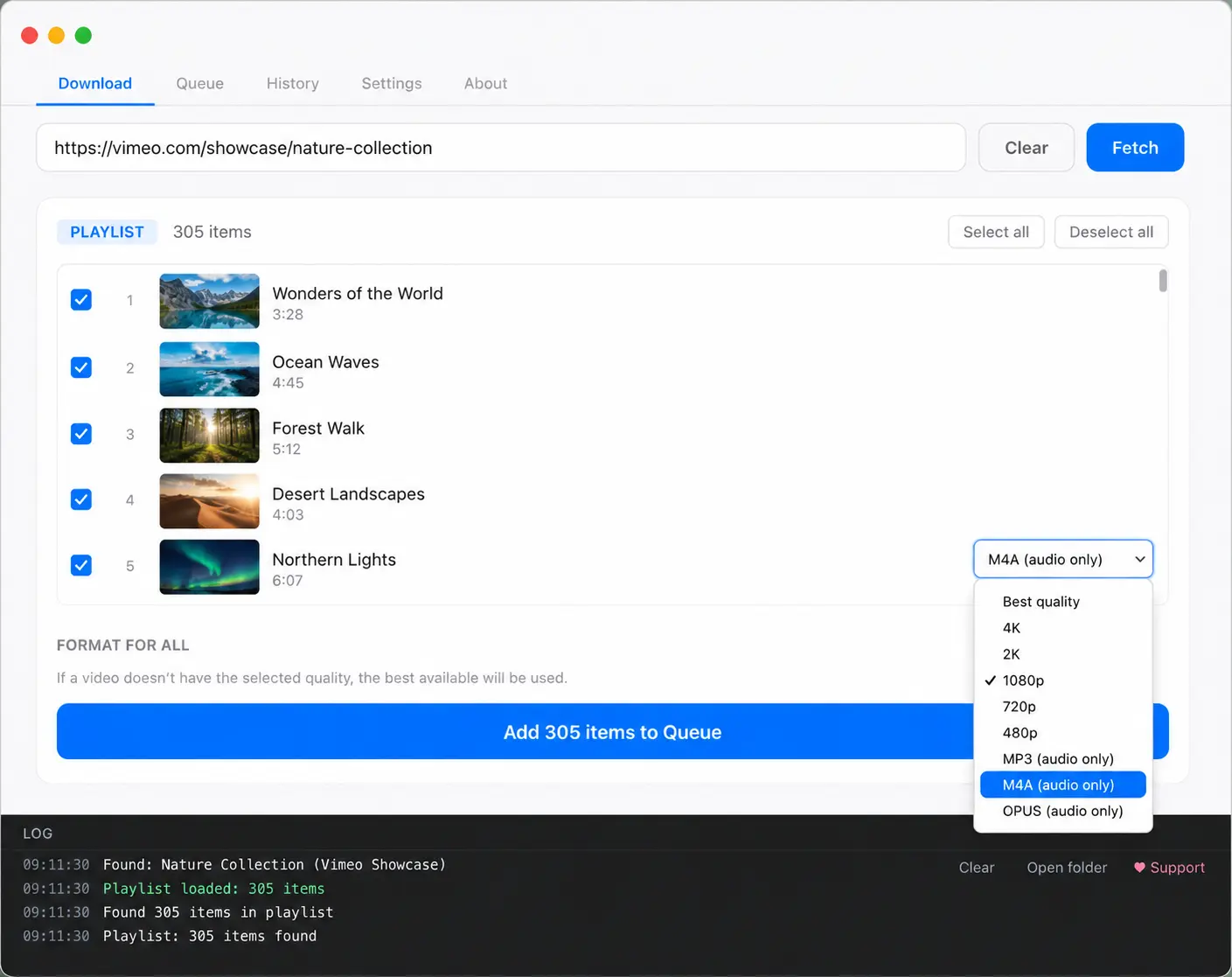
Downloading a playlist one video at a time is slow and boring. Most online downloaders only handle single videos, and the ones that do playlists usually cap you at a handful of videos or low quality.
ArcDLP is a free desktop app for Mac, Windows and Linux that downloads an entire playlist, or a whole channel, in one go. You choose which videos you want and one format for all of them, and it works through the list on its own.
How to download a whole YouTube playlist
- Download ArcDLP and open it.
- Copy the playlist link. It looks like
youtube.com/playlist?list=.... A video link with&list=in it works too. - Paste it into ArcDLP and click Fetch. The videos appear one by one with their thumbnails as the list loads.
- Untick any videos you don't want.
- Pick one format for the whole batch at the bottom: Best, a resolution like 1080p or 720p, or MP3, M4A or Opus for audio only.
- Click Add Selected to Queue. The videos download one after another into
your
Downloads/ArcDLPfolder.
How to download every video from a channel
Paste the channel's address instead of a playlist, for example
youtube.com/@name/videos. The Shorts and Live tabs
(/shorts and /streams) work the same way, and so do older
/channel/ links. Big channels can take a little while to list, so ArcDLP shows
videos as they arrive.
While a long list is loading, the Fetch button turns into Stop. Click it any time to stop early and keep everything found so far.
Download a playlist as MP3 or M4A
Music playlists, podcasts and lecture series often make more sense as audio. Choose MP3 for the widest support, M4A for Apple Music and iPhone, or Opus for the smallest files. Each file gets its title, artist and cover art.
For long mixes and full albums uploaded as one video, tick Split into chapter files and every chapter becomes its own track.
What happens if a video fails?
Nothing dramatic. Large playlists nearly always contain a deleted, private or region-blocked video. ArcDLP marks that one as failed and keeps going with the rest. When the queue finishes you can retry the failed items, or remove them.
Videos download one at a time on purpose. Firing dozens of downloads at YouTube at once is the quickest way to get slowed down or blocked.
Private and unlisted playlists
Unlisted playlists work with their link, no account needed. For a private playlist, or videos that need you to be signed in, open Settings → YouTube Account and sign in on Google's own login page. ArcDLP never sees your password.
Playlists on other sites
It's not only YouTube. SoundCloud sets, albums on music sites, and Instagram saved collections open as lists the same way. For single videos from other sites, see how to download a video from any website.
Where the files go
Everything is saved to Downloads/ArcDLP, named after each video's title with its ID
in brackets, for example My Video [dQw4w9WgXcQ].mp4. Change the folder under
Settings → Storage, or click Open folder to jump straight
there.
FAQ
Can I download a YouTube playlist as MP3?
How many videos can I download at once?
Can I download a whole YouTube channel?
Does it work with private or unlisted playlists?
Why does a YouTube Mix link only give me one video?
Download ArcDLP
Free and open source. v1.5.2. yt-dlp, ffmpeg and Deno are built in, so there is nothing else to install.